
Companies waste thousands of hours every year managing paper documents. At Scan N More, we’ve seen firsthand how digital document access transforms operations, cutting administrative overhead while keeping sensitive information protected.
The challenge isn’t choosing between security and accessibility-it’s building systems that deliver both. This guide walks you through the practical steps to transition your organization to seamless, secure digital documents across all devices.
How Digital Documents Cut Real Costs
Paper Drains Time and Money
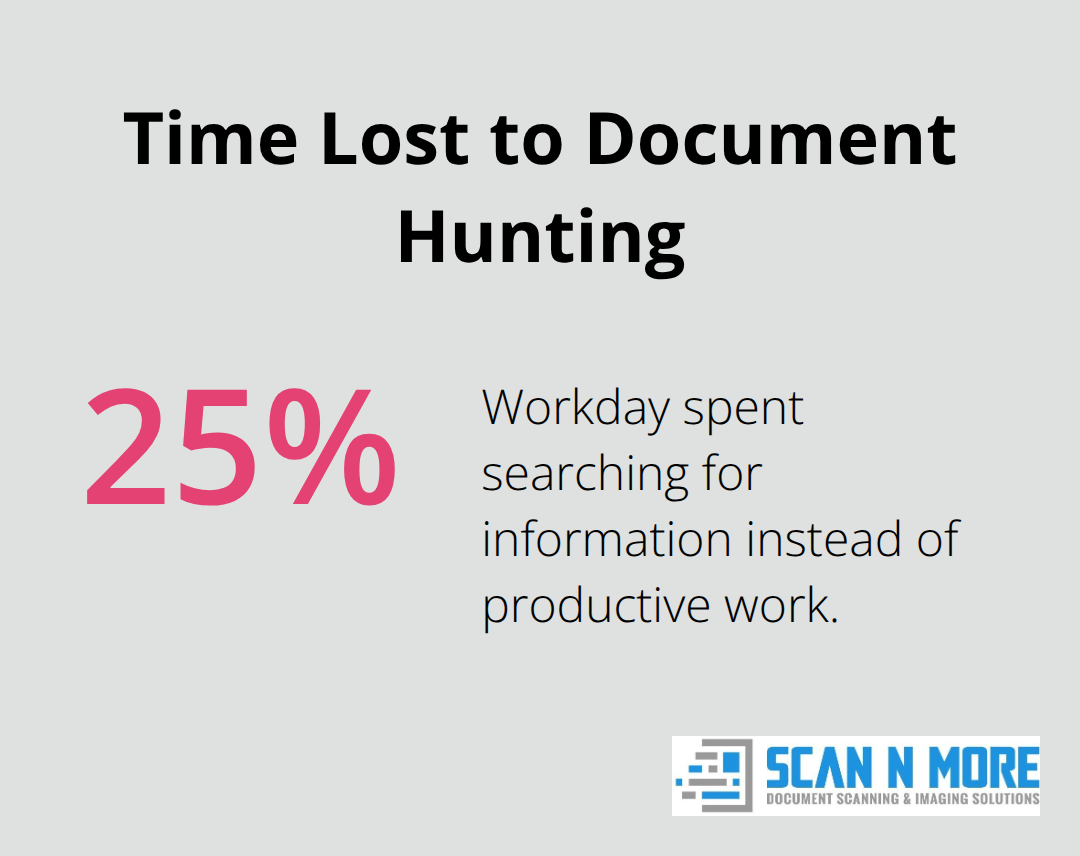
Paper-based document management drains resources at a scale most organizations underestimate. Employees spend an average of 1.8 hours each day just searching for information, meaning almost 25% of an employee’s workday goes to document hunting instead of revenue-generating work. The pattern holds across healthcare, legal, and financial services: paper creates friction at every operational level.
When you digitize documents, that friction disappears.
A financial services firm reduced document retrieval time from an average of 45 minutes to under 2 minutes through digital access. The cost savings compound quickly. Physical storage for paper documents costs between $4 and $8 per file annually when you factor in climate-controlled space, filing systems, and staff time managing the archive. A mid-sized company with 100,000 documents pays $400,000 to $800,000 yearly just to store and maintain them. Digital storage costs a fraction of that, with cloud providers charging roughly $0.50 to $3 per document annually depending on access frequency and security requirements.
Compliance Becomes Automated, Not Manual
Paper creates compliance headaches that digital systems eliminate instantly. Regulatory bodies like HIPAA and FINRA require audit trails showing who accessed what information and when. Paper documents offer no automated tracking, forcing compliance teams to manually document everything or face civil monetary penalties ranging from $145 to $2,190,294 per violation. Digital documents with access control and automatic logging solve this problem without manual intervention. Your compliance team stops fighting the system and starts managing actual risk.
Remote Work Requires Digital-First Infrastructure
Hybrid and fully remote workforces require document access from anywhere, at any time. Paper fails completely in this scenario. Digital documents accessed through cloud platforms mean your team works from home, client sites, or across multiple offices without losing productivity. Cloud solutions enable seamless reading and access across desktop, mobile, and web with offline modes so employees view documents without internet connectivity.
This flexibility directly impacts hiring and retention. Companies offering remote work options see 25% lower turnover rates compared to office-only policies, according to workforce studies. When your document systems support remote access, you remove a major barrier to flexible work arrangements. The operational reality is straightforward: if your documents are trapped on paper or locked to office servers, remote work becomes a headache rather than an advantage. Digital-first organizations onboard remote employees faster, reduce IT friction, and maintain productivity consistency across distributed teams.
Scaling Grows Your Business, Not Your Overhead
Growing companies hit physical limits with paper. You run out of filing space. You hire more staff just to manage documents. You struggle to implement consistent processes across multiple locations. Digital systems scale infinitely without hiring overhead. Adding 10,000 new documents costs virtually nothing in terms of infrastructure. Adding 10,000 physical documents requires more filing cabinets, more space, and potentially more staff.
Organizations that digitize early avoid this scaling trap entirely. The transition itself pays dividends immediately through reduced administrative overhead and faster document retrieval. The long-term advantage comes from building systems that grow with your business without proportional cost increases. As your organization expands, your document infrastructure expands with it-without the physical constraints that trap paper-based operations. This foundation matters because security and accessibility both depend on having systems designed to handle growth from the start.
How Digital Documents Get Breached and What Actually Stops It
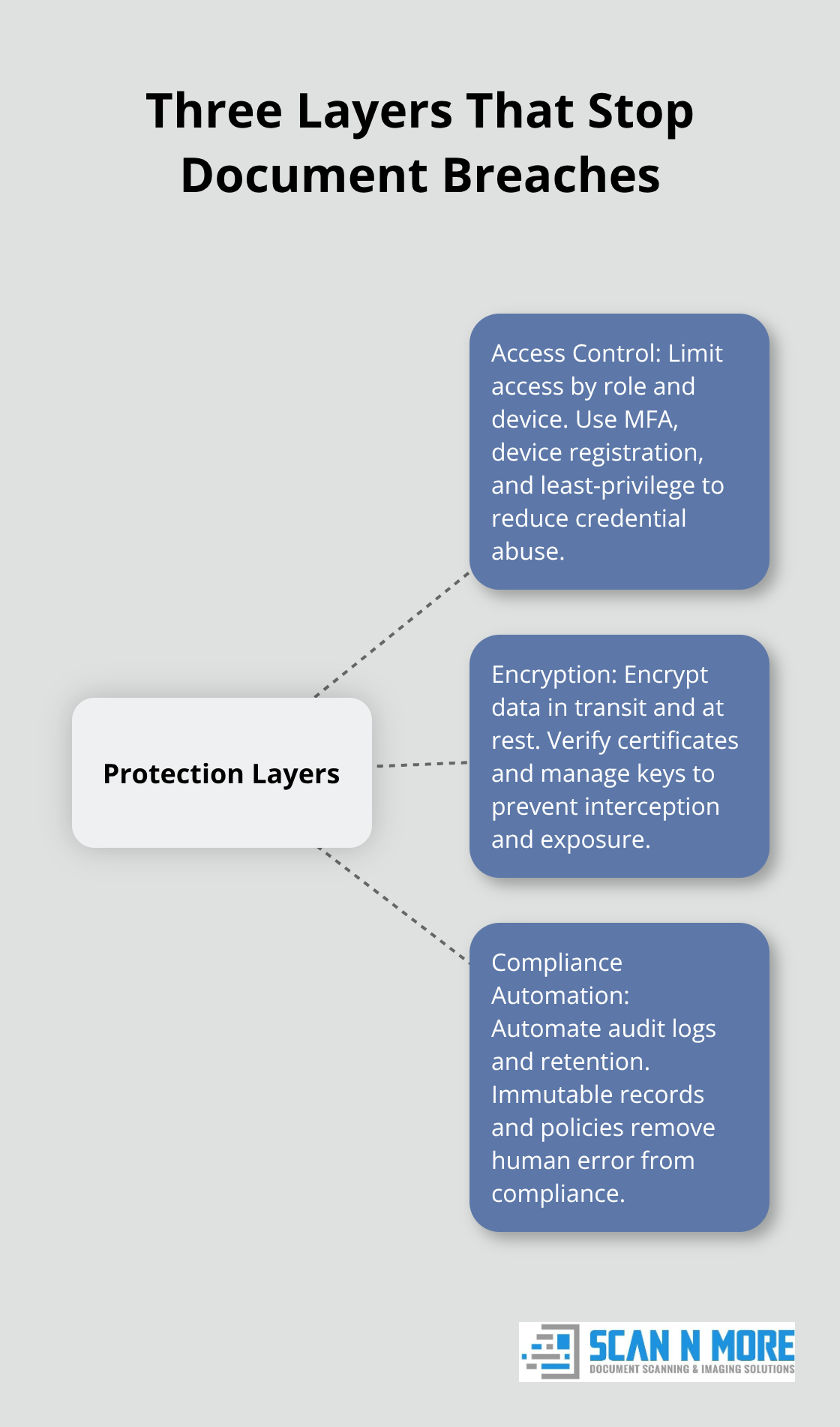
Digital documents eliminate paper’s physical vulnerabilities, but they introduce new attack surfaces that organizations often overlook. The healthcare industry suffered the highest average breach costs at 10.93 million USD, followed by the financial sector at 5.9 million USD. Hacking remains the leading cause of healthcare breaches, and the problem extends beyond healthcare into financial services and legal industries where document theft carries regulatory penalties. Attackers target stored documents through weak access controls, unencrypted transmissions, and poorly managed device access. The fix requires three specific layers of protection that most organizations implement incompletely.
Stop Attackers at the Access Control Layer
Weak access controls represent the largest vulnerability in digital document systems. Too many organizations grant broad document access to everyone in a department, assuming internal users pose no risk. This assumption costs money. The Ponemon Institute found that criminal attacks account for the majority of breaches, meaning external attackers often gain entry through compromised employee credentials or unmanaged device access. Implement role-based access control where employees access only documents their job requires. A customer service representative should never access payroll documents. A junior accountant should never access executive financial forecasts.
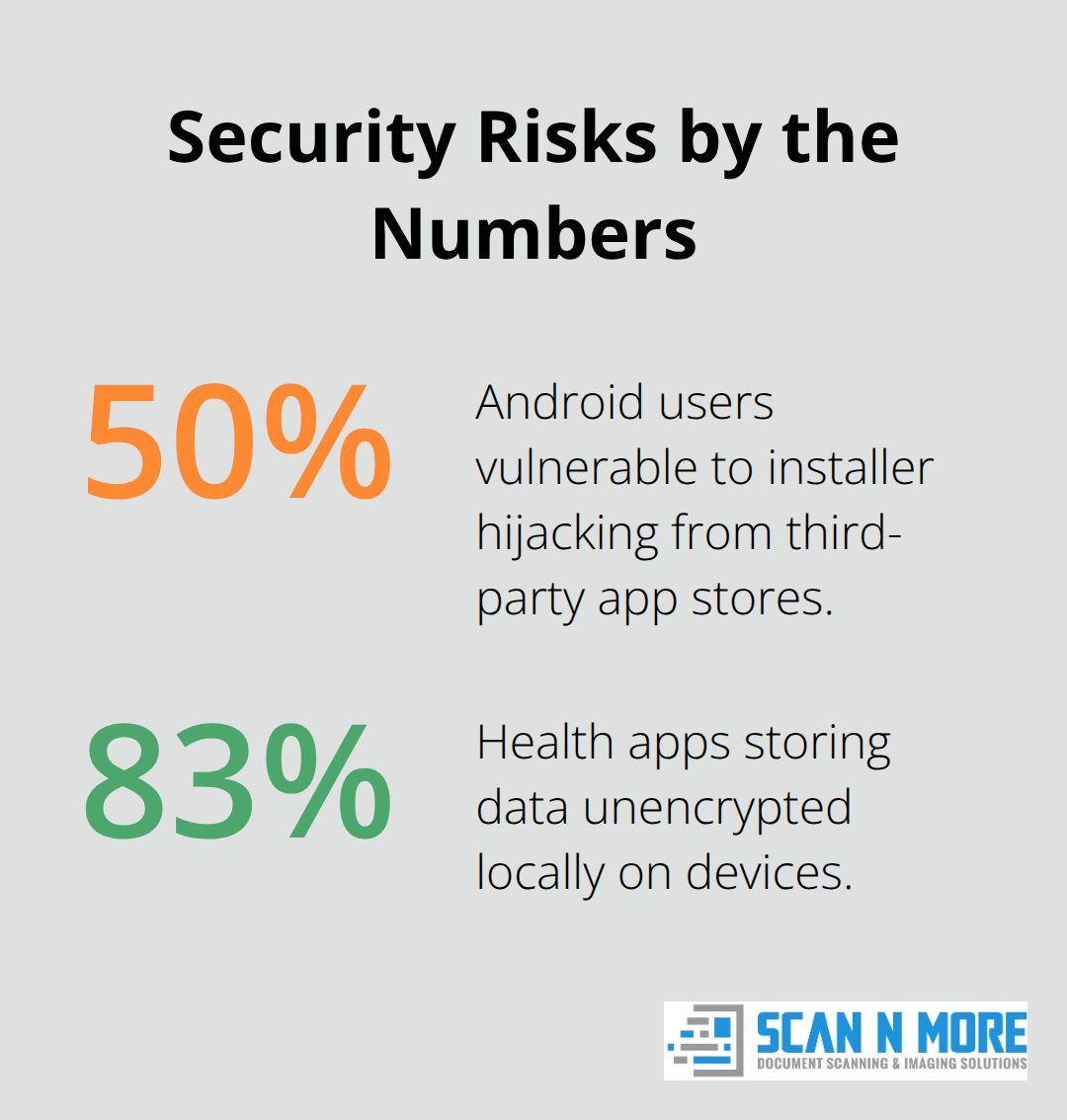
Define access policies before digitizing, not after. For documents accessed across multiple devices, enforce device registration and tracking so you know which specific devices can access sensitive content. This matters because 50 percent of Android users remain vulnerable to installer hijacking attacks that grant attackers full device access through compromised apps from third-party stores. Require two-factor authentication for accessing sensitive documents on mobile devices, and enable remote wipe capability so stolen devices don’t expose your archives. Cloud providers including Dropbox and Microsoft Azure offer granular permission controls that let you restrict who downloads, shares, or edits specific documents. Use these controls aggressively for sensitive files.
Encryption Must Cover Both Storage and Movement
Unencrypted data in transit represents an obvious target that attackers exploit constantly. Man-in-the-middle attacks intercept unencrypted document transfers across networks, especially on public WiFi where rogue hotspots capture unprotected data. Require end-to-end encryption for all document transmission, meaning documents remain encrypted from the sender’s device through transmission to the recipient’s device. SSL/TLS encryption relies on valid certificates from trusted authorities, so verify that your document platform uses current certificates from recognized providers. Compromised or expired certificates create vulnerability.
Storage encryption matters equally. The FTC found that roughly 83 percent of health apps store data unencrypted locally on devices, creating exposure if devices get stolen or compromised. Encrypt documents at rest on cloud servers and on local devices. Most modern cloud platforms encrypt data automatically, but verify the encryption standard and key management practices. Ask your vendor whether encryption keys are managed by your organization or the provider. For highly sensitive documents, demand customer-managed encryption keys where you retain control over who can decrypt files.
Transmission encryption also applies to email and messaging. Encrypt email attachments and payloads rather than sending documents through unencrypted email channels. Verify recipient email addresses before sending, use separate credentials for decryption, and log all communications for audit purposes. Phishing drives a large share of healthcare breaches according to Mandiant research, so treat email as an attack vector rather than a secure communication method.
Compliance Automation Eliminates Manual Failure Points
Manual compliance processes fail because they depend on human consistency. HIPAA requires documented audit trails showing access to protected health information, but manually logging this information creates gaps and falsifiable records. Digital systems with automatic access logging create tamper-proof audit trails that regulators accept. Your compliance team should verify that your document platform logs who accessed each document, when they accessed it, from which device, and what actions they performed. Audit logs should be immutable, meaning they cannot be edited or deleted after creation.
FINRA regulations for financial services require similar documentation. Different industries impose different retention requirements, so implement retention policies that automatically delete documents after the required period expires. This prevents accidental violations where old documents remain accessible longer than regulations permit. Compliance across multiple jurisdictions becomes manageable when your platform supports region-specific retention rules. A document subject to EU regulations might require deletion after five years, while the same document type in California might require retention for seven years. Automated lifecycle management handles this complexity without manual intervention.
Conduct a data security management audit before digitizing to identify which document types require which retention periods and access restrictions. This planning prevents expensive retrofitting later. Cloud platforms including Access Information Management provide retention guidance across 220,000 jurisdictions worldwide, automating cross-border compliance so your team focuses on actual risk rather than regulatory paperwork. With these three protection layers in place, your organization moves from reactive breach response to proactive threat prevention, creating the foundation for secure multi-device access that the next section explores.
How to Make Documents Accessible Across Every Device Your Team Uses
Cloud platforms form the foundation of multi-device document access, but selecting the right one requires understanding how your team actually works. Organizations repeatedly pick platforms based on marketing promises rather than real operational needs. The difference matters because the wrong choice creates friction that undermines your entire digital strategy. Dropbox, Microsoft OneDrive, and Google Drive handle basic file sharing, but they differ significantly in offline capabilities, encryption options, and mobile performance. Dropbox excels at cross-device synchronization with offline modes that let employees view documents without internet connectivity, critical for field teams and traveling staff. Microsoft OneDrive integrates tightly with enterprise environments running Office 365, making it the practical choice if your organization standardizes on Microsoft tools. Google Drive prioritizes real-time collaboration and works best for teams that edit documents simultaneously rather than accessing them sequentially.
For document-heavy organizations handling sensitive files, neither generic cloud platform provides sufficient access control granularity. Specialized platforms offer role-based permissions, device-level restrictions, and audit logging that generic cloud services cannot match. The practical decision framework requires mapping your actual usage patterns first. How many employees need simultaneous access to the same document? Do field teams require offline reading? What compliance standards govern your documents? Organizations that answer these questions before selecting a platform avoid expensive migrations later.
File Formats Determine Cross-Device Consistency
File format compatibility determines whether your documents display consistently across devices, and this decision should happen during your digitization process, not after. PDF remains the only truly universal format that renders identically on desktop browsers, mobile apps, iOS, Android, Windows, and Mac systems without conversion or rendering variations. Microsoft Word documents display differently depending on which software opens them, with spacing, font rendering, and layout variations that create inconsistent reading experiences across devices.
Organizations that scan paper documents should output directly to searchable PDF rather than converting to Word or other editable formats unless editing is genuinely required. Searchable PDFs created through OCR scanning enable employees to search document text instantly without opening every file manually, dramatically improving retrieval speed compared to non-searchable scans or image formats. JPEG and TIFF files lack this searchability entirely and create mobile viewing problems because they require zooming and panning rather than reflowing to screen size.
For documents exceeding 50 MB, compression becomes essential because large files slow mobile downloads and create transmission problems on weak networks. Implement image compression during scanning to reduce file size while maintaining readability. Compression during scanning prevents transmission bottlenecks that encourage employees to skip encryption entirely.
Device Registration Prevents Unauthorized Access
Device registration systems prevent unauthorized access while enabling legitimate cross-device reading without creating friction. Organizations implementing buffered device limits that publicly allow two devices with internal capacity for five devices balance security against the reality that employees switch between work laptops, personal tablets, smartphones, and home computers. When an employee attempts to access documents from a sixth device, the system redirects them to a device management portal rather than blocking access immediately, preserving reading continuity while requiring intentional action to free a slot.
This approach cuts DRM-related support inquiries by up to 70 percent compared to strict enforcement that locks out employees after hitting device limits. Self-service de-authorization lets users remove old devices without contacting support, reducing administrative burden while maintaining security. Enforce cooldown periods requiring 30 days between device removals to deter account sharing, then require email verification before removing a device to confirm the request comes from the legitimate account holder.
Hardware-Based Device Binding Enables Seamless Transitions
Hardware-based device binding through Hardware Identity protocols recognizes devices by OS version, browser engine metadata, and language settings rather than relying on IP addresses, enabling device recognition to persist across location changes and network transitions. This matters because employees working remotely often connect through VPNs that change their IP addresses constantly, but their device environment remains stable. Employees traveling between office and home access documents seamlessly without re-authenticating repeatedly.
The alternative approach using IP-based access control forces re-authentication every time an employee changes networks, creating friction that drives workarounds like sharing passwords or leaving devices logged in permanently. Hardware binding solves this problem by maintaining device identity across network changes, allowing legitimate users to work without interruption while preventing unauthorized access from unfamiliar devices.
Mobile Device Controls Address Higher Risk Exposure
Mobile device access requires stricter controls because phones and tablets face higher theft and compromise risks. Require PIN protection on all mobile devices accessing documents, enable remote wipe capability so stolen devices cannot expose archives, and restrict app permissions aggressively to prevent malicious applications from accessing document storage. Android remains particularly vulnerable to security threats.
Restrict document access to official app stores only and require two-factor authentication for first-time mobile access to sensitive documents. These controls prevent casual device sharing while preserving legitimate multi-device reading for employees who need it. Organizations that implement these protections report significantly fewer security incidents involving mobile devices compared to those relying on password protection alone.
Final Thoughts
Digital document access eliminates the operational friction that paper creates while introducing security requirements that demand attention. Organizations that transition successfully balance accessibility with protection, building systems that serve both employee productivity and compliance obligations. The benefits compound over time: reduced retrieval time, lower storage costs, automated compliance logging, and seamless remote work capabilities that paper-based systems cannot match.
Transitioning from paper requires a structured approach rather than rushing to digitize everything simultaneously. Start with your highest-value documents-those accessed frequently, stored expensively, or subject to regulatory requirements-and digitize these first to demonstrate quick wins that build organizational support for broader implementation. Establish access policies before scanning begins, define who needs which documents and what devices they access them from, and implement encryption for documents in transit and at rest during the transition process.
We at Scan N More understand that digitization success depends on quality scanning combined with strategic planning. Our professional document scanning services transform paper-based processes into digital solutions with on-site and off-site scanning for all document formats, including legal and medical documents, while ensuring data security and compliance throughout the process. Contact Scan N More to begin your transition with scanning expertise that supports your long-term digital document access strategy.