
Scan N More · AI-assisted document services

Document Intelligence &
AI Document Processing Services

Turn scanned records and existing PDFs into organized files and usable data

with AI-assisted PDF sorting, data extraction, and indexing.

Go beyond a searchable PDF

Your documents can do more than sit in a folder.

Scanning makes records digital. Document Intelligence helps make them useful. Our AI document processing services combine OCR, AI-assisted sorting and data extraction, and quality review to organize your files and capture the information your team needs.

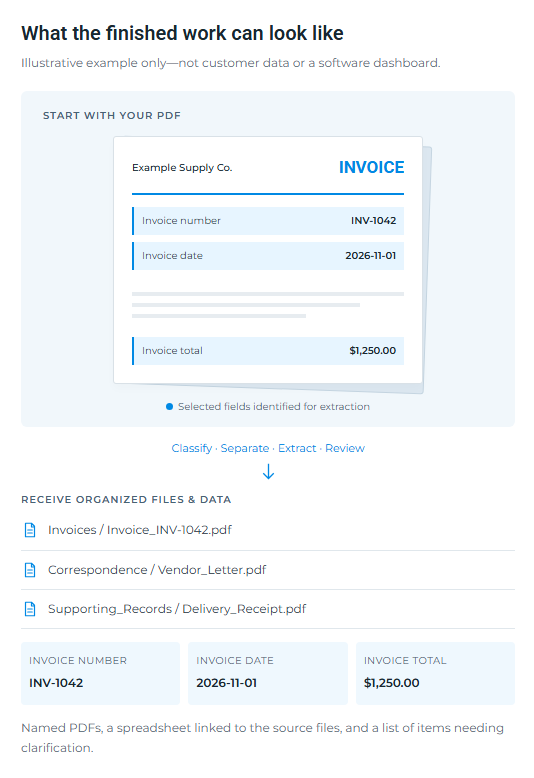
Start with paper records we scan for you, or PDFs you already have. We agree on the categories, fields, and output before processing a larger batch.

Screenshot of a web UI showing an invoice example with fields: INV-1042, 2026-11-01, and $1,250.00, along with file links and navigation options.

Choose the help you need

AI document processing. Clear deliverables.

Use one service to solve a specific problem, or combine them into a complete document-processing workflow.

Blue folder icon with a small page overlay on light blue background

Document classification

Identify invoices, claims correspondence, forms, reports, and other agreed document types. Group files into categories your team actually uses.

What you receive: Categorized PDFs and a document-type index.

Organizational chart icon with a top box connected to two lower boxes in a hierarchical layout

PDF sorting, separation & naming

Break a large PDF into individual documents or approved chart sections. Apply consistent filenames using verified identifiers and your naming rules.

What you receive: Separated, clearly named files.

Blue document icon with folded corner on light blue background

AI-assisted data extraction

Capture selected fields such as invoice totals, dates, claim references, addresses, and project numbers into a usable spreadsheet.

What you receive: Excel or CSV data with source-file references.

Light blue calendar icon with a white-grid grid and darker blue top bar

Searchable indexes & archive audits

Create a master list of your records. Flag potential duplicate files, missing identifiers, or unreadable PDFs for review before you act.

What you receive: An archive index and exception report.

Organizational chart icon with a top box connected to two lower boxes in a hierarchical layout

Mail & document routing

Organize scanned mail into approved folders or delivery queues by client, claim reference, department, or document type.

What you receive: Organized batches and a routing register.

Light blue rounded square icon with a downward arrow into a tray (download symbol)

Import-ready file preparation

Prepare PDFs and a load file for a customer-approved EMR or document system, using its supplied format and verified record identifiers.

What you receive: An import package, subject to system requirements.

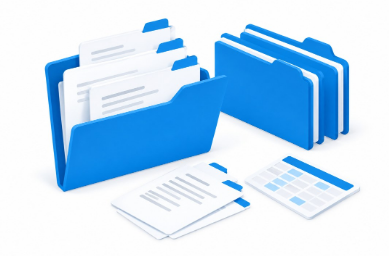
Blue folders with documents on a white desk, plus loose sheets and a calculator.

The finished result

An organized archive not just a stack of PDFs.

Agreed categories, clear names, and a master index make records easier to locate and use.

Three light-blue rounded buttons labeled Named PDFs, Excel / CSV, and Review queue in a row

Conceptual illustration. Your folder structure and deliverables are agreed before processing.

The finished result

An organized archive not just a stack of PDFs.

Workers’ comp & insurance

Classify incoming mail, capture claim references, and prepare folders or intake lists for your team’s review.

Healthcare practices

Separate chart sections and build indexes or import files using practice-approved patient identifiers.

Legal & professional services

Organize case documents, correspondence, and agreements by approved client or matter identifiers.

Business & public archives

Index invoices, project files, permits, and plan records by verified addresses, reference numbers, or dates.

A controlled process

See the result before you scale.

A representative sample helps define what can be extracted reliably and what needs additional review.

01

Define the outcome

Choose the document types, fields, naming rules, delivery format, and security requirement

02

Review a sample

Evaluate a small, approved batch together. Confirm the output and any exceptions before production.

03

Process & check

Apply the agreed workflow, perform quality checks, and flag uncertain items for clarification.

04

Deliver usable files

Receive organized PDFs, your agreed index or data file, and an exception report where needed.

Blue shield with white checkmark inside

AI assistance. Accountable handling.

AI can misread handwriting, poor scans, or ambiguous identifiers. Review requirements are agreed for each project; uncertain records are flagged rather than silently matched. Sensitive projects require approved access, secure transfer, confidentiality terms, and applicable BAAs before processing.

System imports need the customer’s authorization and confirmed technical requirements. We do not make clinical decisions, determine legal deadlines, or promise automatic access to your software.

Woman at desk reviewing documents with calendar on monitor and office plants nearby.

Unclear fields go to review—not silent guesses.

One connected document workflow

Add intelligence to your scanning project.

Document Intelligence works alongside our existing scanning, mail, OCR, and document-management services. It can also be scoped for an archive you have already digitized.

Pricing depends on document volume, complexity, fields, and review needs. We confirm the scope in an estimate and service agreement before work begins.

Common questions

Questions about AI document processing

Yes. We can assess your existing PDFs and propose an organization or extraction workflow. The quality of the source files affects what can be read reliably.

OCR makes readable printed text searchable within a PDF. Document Intelligence adds classification, separation, naming, or extraction into agreed fields and delivery formats.

We can prepare an index or load file to the specifications your system provides. Actual import or integration is separately scoped, authorized, and tested. Patient charts must be linked using verified identifiers—not names alone.

We can discuss a representative sample and agree on its scope and any charges before starting. Please do not email patient records or other sensitive documents; we will arrange an approved transfer method.

Let’s make your records more useful

Tell us what you want to find, organize, or extract.

Share the types of documents you have and the result you need. We’ll help define a practical next step.

Call (800) 593-1826

info@scannmore.com