
Data loss costs businesses an average of $5,600 per minute of downtime, according to industry research. At Scan N More, we’ve seen firsthand how the right data backup and security strategy prevents catastrophic losses.
Your backups are only valuable if they’re protected. This guide walks you through implementing a backup system that actually works when you need it most.
Why Data Loss Threatens Your Bottom Line
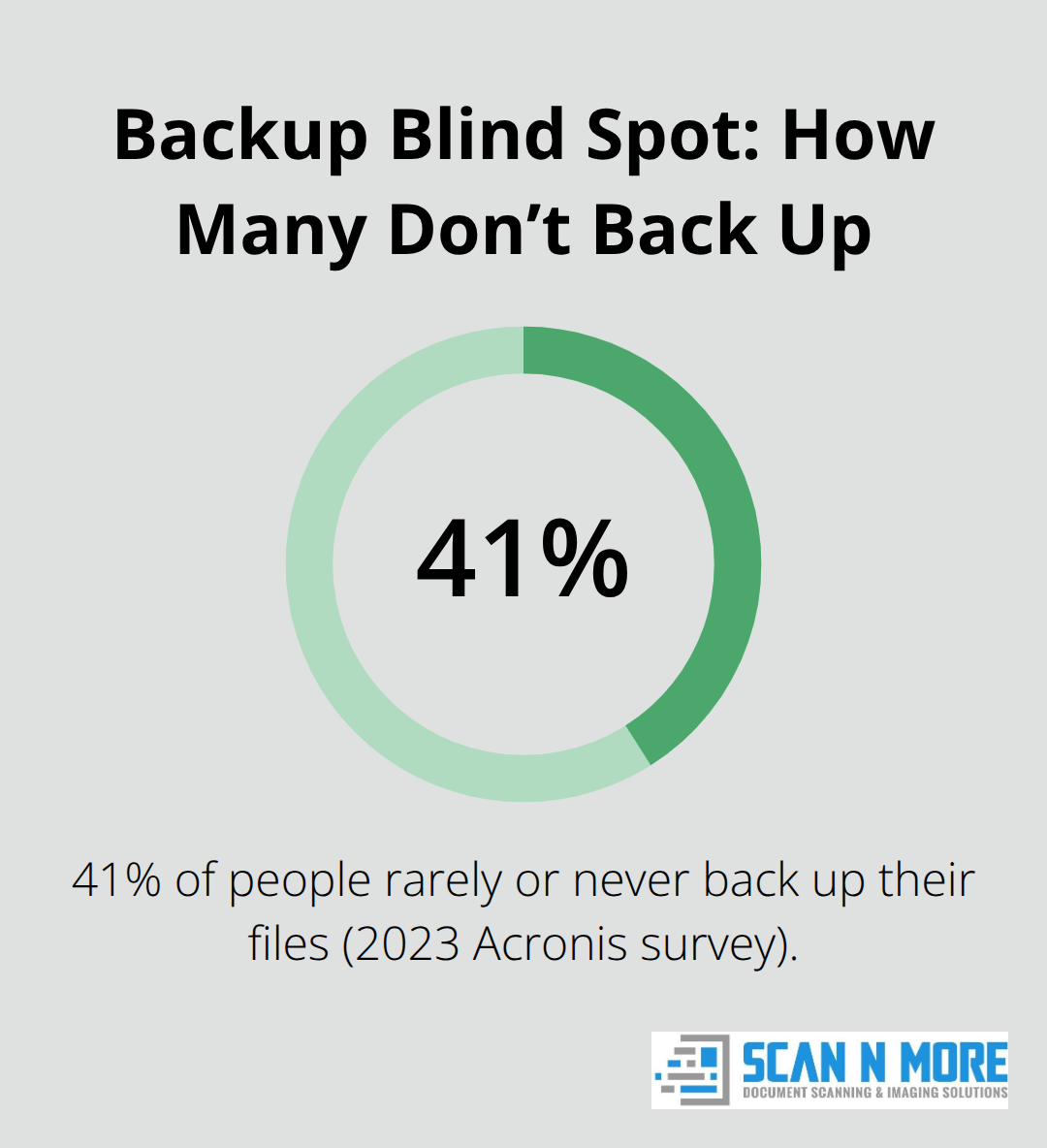
Data loss destroys revenue and operations simultaneously. Businesses lose an average of $5,600 per minute during downtime, and a single incident wipes out months of profit for many companies. The 2023 Acronis survey revealed that 41% of people rarely or never back up their files, leaving organizations exposed to catastrophic failure. When ransomware strikes or hardware fails, companies without backups face impossible choices: pay attackers, lose critical information, or shut down entirely.
Prevention costs far less than recovery, which is why backup strategy should be your first line of defense, not an afterthought.
Regulatory Obligations Make Backups Non-Negotiable
Compliance isn’t optional. Industries like healthcare, finance, and legal services face strict regulations requiring documented data protection. HIPAA, PCI-DSS, and SOX mandate that you maintain recoverable copies of sensitive information. Failing an audit or investigation without proper backups results in fines, license suspension, or criminal liability. Your backup system must prove that you can restore data within specific timeframes-vague promises don’t satisfy regulators. Companies operating across multiple jurisdictions face even steeper requirements; a European subsidiary must comply with GDPR’s data protection standards, while US operations follow different rules. The cost of implementing a solid backup strategy pales in comparison to regulatory penalties.
Ransomware Attacks Target Both Your Data and Your Recovery Options
Ransomware attacks have become the primary threat to business continuity. Attackers encrypt your files and demand payment for decryption keys, but paying guarantees nothing. A backup system that includes offline or immutable copies allows you to restore without negotiating with criminals. Fewer than 20% of businesses back up their SaaS data like Google Workspace or Microsoft 365, despite these platforms offering no guarantees of full recovery after an attack. Local backups alone fail when ransomware deletes them alongside your primary systems. Hybrid approaches combining cloud storage with offline copies protect against this scenario. Your backup strategy must assume that attackers will target both your production data and your recovery options-design accordingly.
Multiple Backup Locations Protect Against Single Points of Failure
A single backup location creates vulnerability. If attackers compromise your primary systems and your backup simultaneously (whether through ransomware, theft, or physical disaster), you lose everything. The 3-2-1 rule for data backup-keeping three copies of your data across two different storage types with one off-site-has long protected organizations from this risk. Storing one copy offline or in an immutable format prevents attackers from deleting all your recovery options. Cloud providers offer geographic redundancy, but relying solely on one vendor leaves you exposed if that provider experiences an outage or breach. Combining on-premises storage with cloud backups and maintaining at least one offline copy creates resilience that no single failure can overcome. This layered approach transforms your backup system from a liability into your strongest defense against data loss.
Building a Backup System That Survives Real Attacks
Combine Local and Cloud Storage Strategically
On-premises and cloud storage serve different purposes in your backup architecture. Local backups on external hard drives or network-attached storage devices restore large data volumes quickly without bandwidth constraints, which matters when your business sits offline. HDDs cost around $15–20 per terabyte for initial setup, while SSDs at $80–100 per terabyte offer faster recovery and better protection against physical damage. Cloud backups eliminate hardware management and provide geographic redundancy that protects against regional disasters.
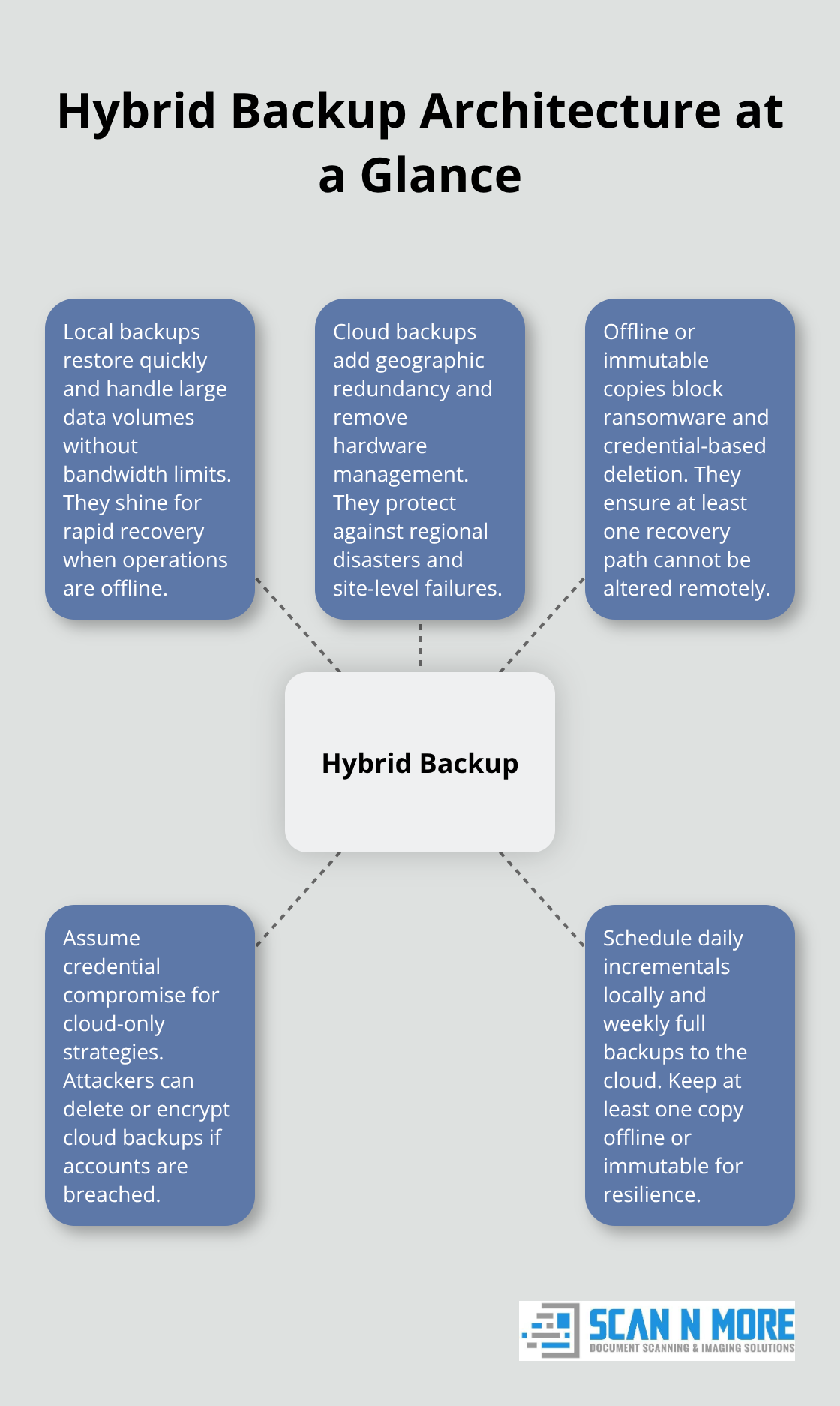
However, cloud-only strategies fail during ransomware attacks: compromised cloud credentials allow attackers to delete or encrypt your cloud backups as easily as your production data. A hybrid approach maintains daily incremental backups to local storage for speed, weekly full backups to cloud infrastructure for disaster recovery, and at least one immutable or offline copy that attackers cannot access remotely.
Test Your Restoration Process Regularly
Backups that you never restore are worthless. Test your hybrid combination by simulating a full system failure and timing restoration from each storage type. If local restoration takes 4 hours but cloud restoration takes 12 hours due to bandwidth limitations, that 8-hour gap represents lost revenue and customer trust. Run quarterly restoration tests by actually recovering files to a test environment, not just verifying that backup files exist. Many organizations discover too late that their backups are corrupted or incomplete because they never attempted a real restore. Document your recovery time objectives (how long your business can tolerate being offline) and your recovery point objectives (how much data loss is acceptable). If you lose 24 hours of transactions, compliance violations or customer refunds result. If so, you need more frequent backups than a weekly schedule provides.
Automate Backups to Eliminate Human Error
Manual backup scheduling guarantees failure. Automation removes the human error that leaves businesses unprotected. Set automated backups to run during off-peak hours when system resources are available and user activity won’t slow the process. Critical data like financial records, customer databases, and email should back up daily, while less volatile information can follow weekly schedules. Immutable backups protect against ransomware actors who try to destroy your recovery options. This approach costs more in storage and management complexity, but it directly addresses the threat landscape you actually face.
Your backup architecture now protects against both accidental data loss and deliberate attacks. The next step involves securing these backups with encryption and access controls so that even if attackers reach your storage systems, they cannot read or modify your recovery data.
Protecting Your Backups From Unauthorized Access
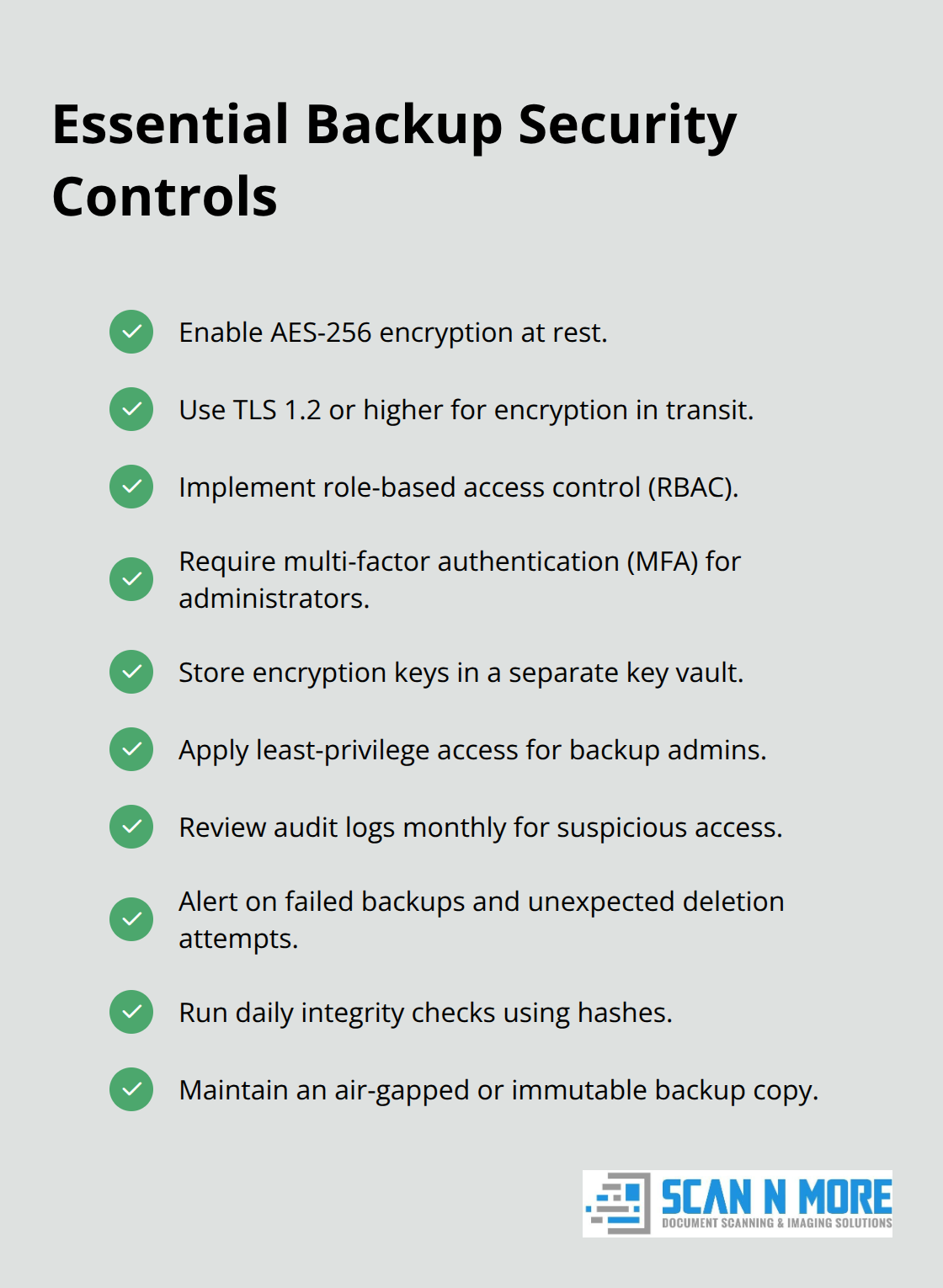
Stored backups mean nothing if attackers can read or modify them. Encryption transforms your backup files into unreadable data without the correct decryption key, making stolen backups worthless to criminals. AES-256 encryption protects data at rest-the same standard federal agencies use for classified information. Encryption in transit (the process of moving backups between your systems and cloud storage) requires TLS 1.2 or higher to prevent interception. Many organizations encrypt only at rest and ignore transit encryption, leaving a critical window where attackers can intercept unencrypted data traveling across the internet.
Control Who Accesses Your Backups
Access controls determine who can read, modify, or delete your backups. Role-based access control restricts backup administration to designated staff while preventing regular employees from touching recovery systems. Multi-factor authentication adds a second barrier: even if an attacker steals a password, they cannot access backups without a second verification method like a hardware token or authenticator app. Revoke access immediately when employees leave your organization-delayed offboarding has leaked backups more often than external attacks. Store encryption keys separately from your backup data. If your backup storage location contains both the data and the keys needed to decrypt it, one breach exposes everything. Cloud providers handle key management for you, but on-premises solutions require you to maintain a separate key vault, which adds complexity but prevents single-point compromise.
Choose Storage Locations That Survive Disasters
Physical location matters more than most businesses realize. Storing backups in the same building as your production systems means a fire, flood, or break-in destroys both simultaneously. Geographic separation across cloud regions protects against regional disasters-if your primary data center sits in one city and your backup sits 200 miles away in a different cloud region, a natural disaster cannot eliminate both. Cross-cloud backups store copies on multiple cloud providers like AWS and Azure, protecting against provider-specific outages or breaches. This approach costs more and complicates management, but organizations handling sensitive financial or medical data benefit from the reduced vendor dependence. Air-gapped storage disconnects backups from your network entirely, making them inaccessible to ransomware or network-based attacks. The tradeoff: restoring from air-gapped storage takes longer because you must manually reconnect the device. Immutable backups prevent deletion or modification for a fixed period, typically 30 days or longer. Immutability differs from read-only status-attackers with sufficient permissions can still delete read-only files, but immutable backups resist deletion regardless of permissions. Choose immutability for critical data that faces ransomware threats.
Monitor Backups for Unauthorized Changes
Monitoring backups prevents silent compromise where attackers modify your recovery data without your knowledge. Set up alerts for unusual backup activity: failed backups, unexpected deletion attempts, or changes to access permissions. Failed backups deserve immediate investigation because they often indicate an attacker trying to prevent recovery options. Audit trails record who accessed backups, when, and what actions they performed. Review these logs monthly to catch unauthorized access patterns. If your backup software lacks built-in monitoring, integrate it with your security information and event management system so that backup events trigger alerts alongside other security data. Test backup integrity regularly by computing checksums or cryptographic hashes of backup files. If a hash changes unexpectedly, your backup has been modified and may not restore correctly. Organizations handling sensitive data should automate integrity checks daily rather than relying on manual verification. Malware can corrupt backups silently, so detection prevents you from discovering a problem only when you attempt to restore during a crisis. Threat detection tools specifically designed for backup systems watch for ransomware signatures and suspicious access patterns that differ from normal administrator behavior. These tools cost extra but directly address the scenario where attackers compromise credentials and attempt to destroy your recovery options.
Final Thoughts
Your data backup and security strategy determines whether a data loss incident becomes a minor inconvenience or a business-ending catastrophe. Organizations that implement local and cloud storage, test restores regularly, encrypt data, control access, and monitor for unauthorized changes reduce downtime costs, satisfy compliance requirements, and protect customer trust. Start by identifying what data matters most-financial records, customer databases, and operational files deserve daily backups with multiple copies across different locations, while less critical information can follow weekly schedules.
Securing your backups requires encryption, access controls, and monitoring that work together to prevent attackers from destroying your recovery options. Enable AES-256 encryption at rest and TLS 1.2 encryption in transit, restrict backup access to designated administrators using multi-factor authentication, and store at least one copy offline or in an immutable format. Monitor backup activity for failures and unauthorized changes, then review audit logs monthly to catch suspicious patterns before they compromise your recovery capability.
Businesses with robust data backup and security strategies recover from incidents in hours instead of days, avoiding the $5,600-per-minute downtime costs that destroy profitability. If your organization still relies on paper documents or unstructured digital files, Scan N More offers professional document scanning services to digitize records securely while ensuring compliance with data protection standards. Once your documents are digital, apply the backup strategies in this guide to protect them permanently.