
Remote work is now the default for millions of employees worldwide. Yet most companies still struggle with secure remote document access, leaving sensitive files vulnerable to breaches and unauthorized viewing.
At Scan N More, we’ve seen firsthand how the right document management system transforms how teams collaborate across locations. This guide covers what actually works.
Why Remote Work Demands Secure Document Access
The numbers tell a clear story: Six in 10 employees with remote-capable jobs want a hybrid work arrangement, while about one-third prefer fully remote work. This isn’t a trend anymore-it’s a baseline expectation. Yet most organizations haven’t caught up with the infrastructure needed to support it safely. Over 4.7 million people in the U.S. spend at least half their work time remotely, and that figure is climbing toward 20% of the entire American workforce by 2025.
Companies that fail to provide secure remote document access don’t just lose productivity. They lose talent. More than 20% of surveyed organizations have reported a data breach tied directly to remote workers, which means the security gap isn’t theoretical-it’s costing businesses real money and credibility right now.
The Real Cost of Scattered Document Systems
When remote teams can’t access documents securely, they resort to workarounds. Employees email files. They use personal devices. They store sensitive data locally instead of in centralized systems. Each workaround multiplies your risk. A CrowdStrike report found that attackers broke into networks in an average of 29 minutes, which means your window to detect and stop a breach is razor-thin. Organizations that centralize document access through secure cloud storage eliminate these dangerous gaps. Teams stop wasting time requesting files through email chains, version control problems disappear, and compliance becomes manageable instead of chaotic. Companies also cut overhead on office space and infrastructure when employees work from distributed locations, freeing capital for security investments instead.
Why Encryption and Authentication Actually Matter
Relying solely on a VPN is risky-security experts agree it should be one layer in a multi-layered strategy that includes multi-factor authentication and strong encryption protocols. End-to-end encryption protects documents in transit, while encryption at rest protects them when stored. Multi-factor authentication stops attackers even if they steal a password. Organizations that implement both see measurable drops in breach attempts targeting their remote workers. The key is choosing tools that make this security invisible to employees. When MFA feels like friction, adoption fails and security fails with it. Systems that balance strong protection with smooth user experience (intuitive design, clear instructions) get real adoption, which means real security.
Moving Beyond Basic VPN Protection
A VPN alone leaves your organization exposed to multiple attack vectors. Attackers who compromise a single password can access your entire network if you don’t layer in additional controls. Multi-factor authentication requires a second verification method-a code from an authenticator app, a biometric scan, or a hardware key-that makes stolen credentials worthless. Encryption at rest protects files even if someone physically steals a device or gains unauthorized access to your storage system. Together, these three controls (VPN, MFA, encryption) create a defense that stops most attacks before they reach your documents. The investment in these tools pays for itself the moment you avoid a single breach.
Building a Culture of Secure Access
Your security tools only work if employees actually use them correctly. Organizations that invest in annual security training see significantly better outcomes than those that treat security as a one-time checkbox. Employees need to understand why they can’t share work devices with family members, why they must lock their computers when stepping away, and why public Wi-Fi is dangerous for sensitive work. Clear policies that explain these rules-and the real consequences of breaches-drive adoption far better than vague warnings. When teams understand that secure remote document access protects their own data and their colleagues’ information, they become partners in security rather than obstacles to it.
The infrastructure for secure remote work exists today. What separates companies that protect their documents from those that suffer breaches is implementation discipline and the right technology choices. The next section covers how to actually build these systems into your organization.
Building Your Secure Remote Access Infrastructure
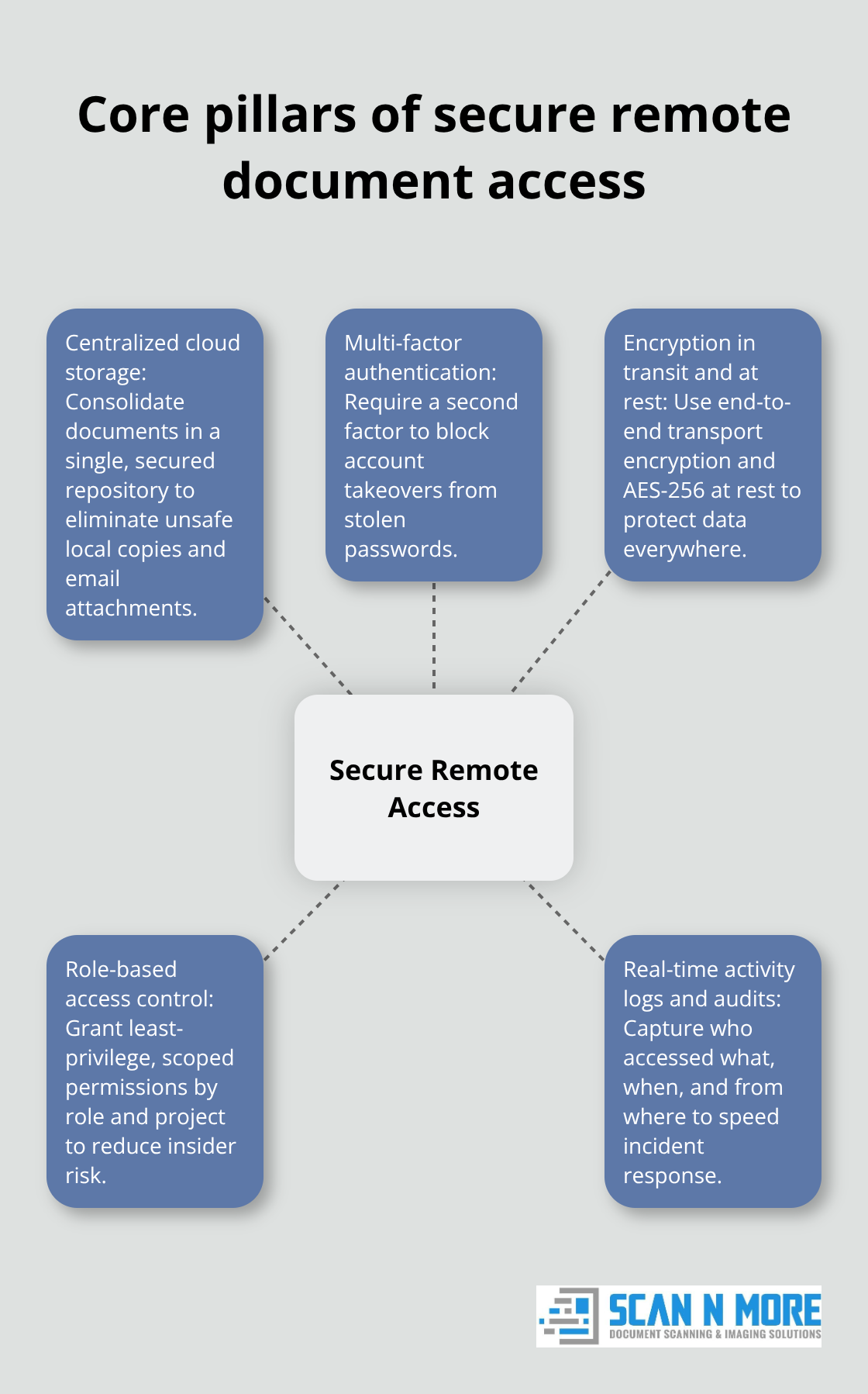
Cloud storage has become the backbone of remote document access, but not all solutions handle security equally. Organizations need systems that enforce encryption in transit and at rest, support multi-factor authentication natively, and integrate with existing identity providers without friction. Solutions that offer role-based access control allow teams to grant precise permissions-a contractor might access only project files, while a manager sees everything in their department. Real-time activity logs and audit trails matter more than most companies realize. When someone accesses a sensitive document, your system should record who, when, what device they used, and their location. This isn’t just compliance theater. These logs catch insider threats and help you respond to breaches in minutes instead of days. Organizations that centralize document access through cloud platforms eliminate the email-and-attachment chaos that creates version conflicts and security gaps. The investment in proper cloud infrastructure typically pays for itself within six months through reduced IT overhead and eliminated productivity losses from file-version confusion.
Making Multi-Factor Authentication Frictionless
Multi-factor authentication stops 99.9% of account compromise attacks, according to Microsoft’s security research, yet many organizations still treat it as optional. The problem isn’t the technology-it’s implementation. When MFA feels cumbersome, employees disable it or work around it, which defeats the entire purpose. The solution involves choosing authentication methods that match your workforce. Authenticator apps work well for office-based teams with consistent device access. Biometric authentication (fingerprint or facial recognition) suits mobile-heavy workforces.
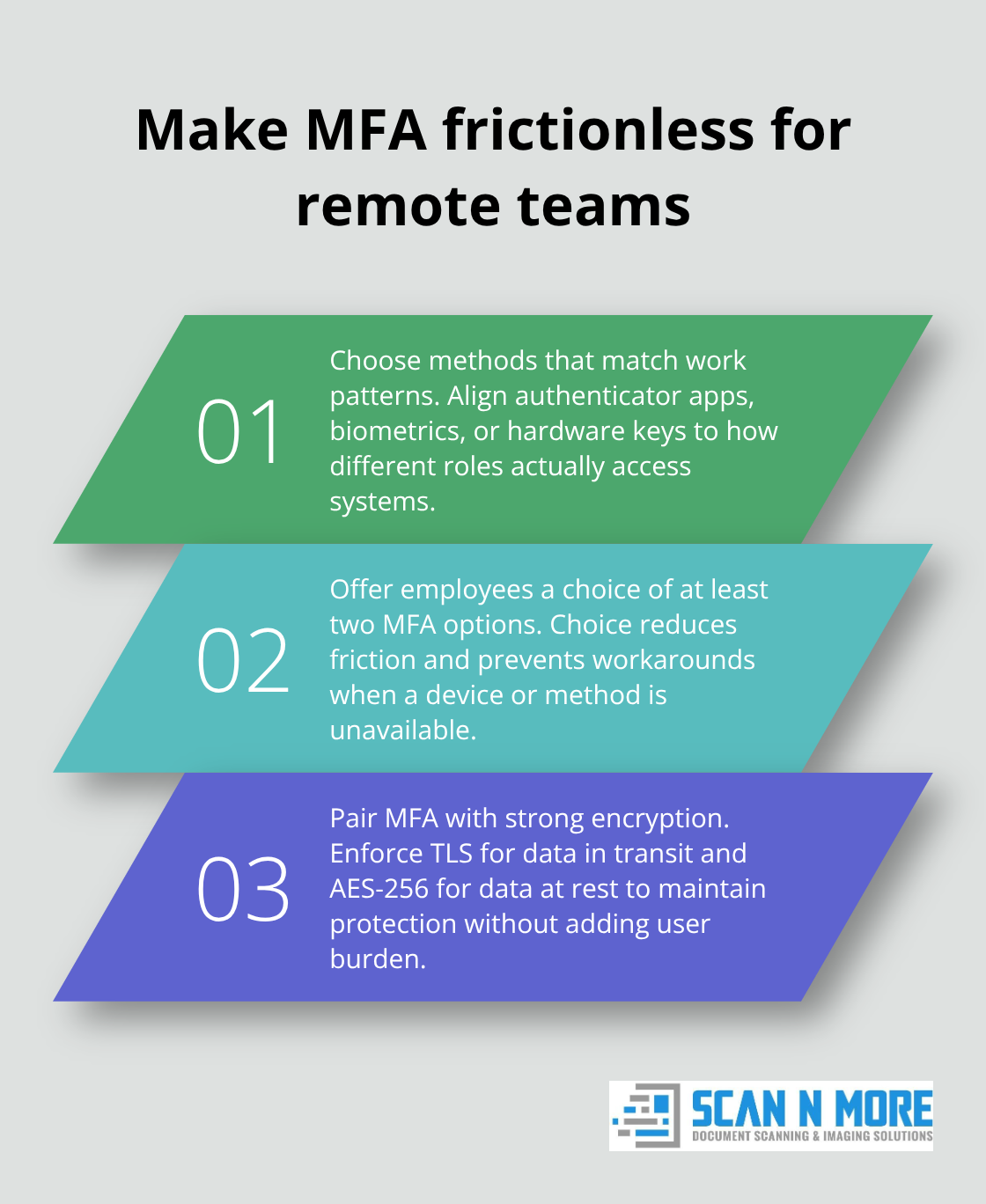
Hardware security keys provide the strongest protection for high-risk roles accessing extremely sensitive documents. The key is supporting multiple methods so employees pick what works for them rather than resenting a mandated approach. Encryption protocols matter just as much. End-to-end encryption protects documents while they travel between devices and servers. Encryption at rest protects stored files even if someone gains physical access to your data centers. Organizations should demand that their document platform uses AES-256 encryption or stronger, which is the current industry standard for protecting classified information. When these controls work together smoothly, employees stop noticing them and security becomes invisible. That’s when adoption becomes universal and your actual protection becomes real.
Connecting Security to Your Existing Systems
Most organizations can’t replace their entire IT infrastructure overnight, which means your remote document access system must integrate with what you already have. This typically means connecting to your identity provider (Active Directory, Okta, Azure AD) so employees use the same credentials they use for email and other tools. Single sign-on eliminates the credential sprawl that leads employees to reuse passwords across systems. Integration with your SIEM (security information and event management) tool centralizes security alerts so your team catches threats without monitoring five different dashboards. Your document platform should also connect to your ticketing system, so access requests and approvals follow your established workflows rather than creating new processes. Organizations that skip these integrations end up with shadow IT systems that employees bypass because they’re too inconvenient. The implementation itself demands clear planning. Identify which departments access which document types, map those requirements to your chosen platform’s permission structure, and pilot the system with a small group before rolling out company-wide. This approach catches integration problems before they affect thousands of employees.
Scaling Access Controls Across Your Organization
Role-based access control forms the foundation of secure remote document access at scale. Different employees need different permissions-finance staff access payroll documents, legal teams access contracts, and support staff access customer files. Your system should enforce these boundaries automatically without requiring manual intervention. Audit trails document every access attempt, whether successful or denied, creating a complete record for compliance audits and breach investigations. Organizations that implement least-privilege access (where employees can only access what they need for their specific role) reduce insider threat risk significantly. Regular access reviews catch permission creep, where employees retain access to documents they no longer need. This practice prevents former contractors and transferred employees from maintaining unnecessary access to sensitive information. The technical controls work best when paired with clear policies that explain why access restrictions exist and what happens when employees violate them.
Planning Your Implementation Strategy
Implementation success depends on identifying your organization’s specific requirements before selecting tools. Map which document types your teams access, where those documents currently live, and what compliance standards apply to them (HIPAA for healthcare, SOX for financial services, GDPR for European data). This assessment reveals whether you need on-premises storage, cloud solutions, or a hybrid approach. Pilot programs with a single department or office location reveal integration gaps and user experience problems before they affect your entire workforce. This staged approach also allows your IT team to develop support procedures and train help desk staff on the new system. Organizations that rush implementation without this planning typically face adoption resistance and security gaps that undermine the entire project. The transition period demands clear communication about why the change matters, how employees will use the new system, and what support is available during the learning curve.
Your organization now has the foundation for secure remote document access. The next step involves establishing the practices and policies that keep this infrastructure effective over time, which requires attention to how your teams actually work with these systems day-to-day.
Keeping Your Remote Document Systems Secure and Compliant
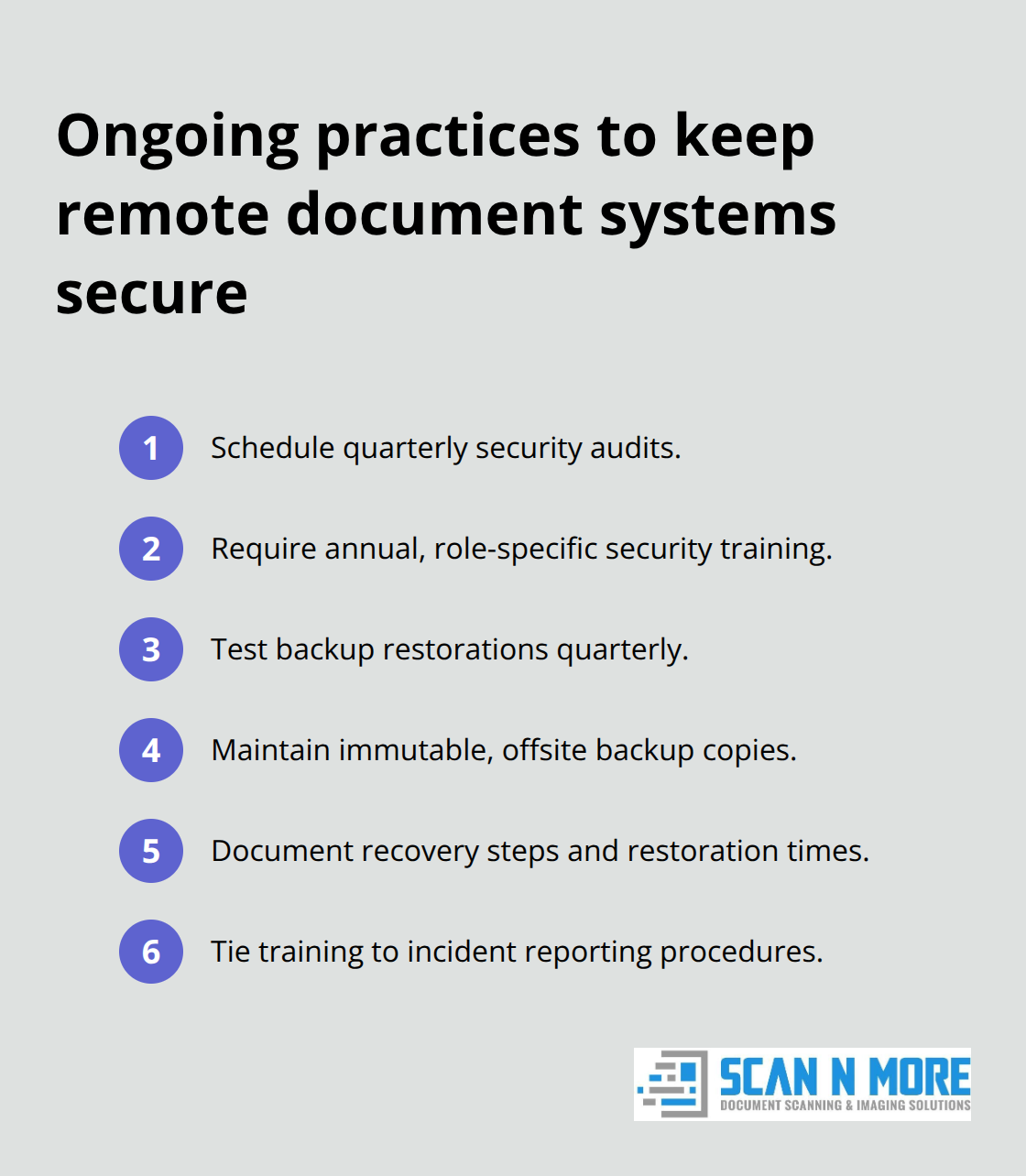
Security infrastructure decays without active maintenance. Organizations that treat document protection as a one-time implementation fail within months as new threats emerge, employees leave, and systems drift out of compliance. The difference between companies that maintain strong security and those that suffer breaches comes down to three operational disciplines: regular audits that catch permission creep and configuration drift, employee training that happens annually rather than once during onboarding, and backup procedures that actually restore data when disasters strike. These aren’t theoretical exercises. Organizations that skip security audits typically discover unauthorized access only after a breach occurs. Annual training reduces insider threats by making employees aware of current attack methods rather than relying on outdated awareness from years past. Backup and disaster recovery procedures that haven’t been tested fail exactly when you need them most, leaving organizations unable to recover from ransomware attacks or hardware failures.
We’ve worked with organizations across healthcare, finance, and legal services where compliance audits revealed shocking gaps: contractors with access to sensitive documents months after projects ended, administrators with permissions far beyond their job requirements, and backup systems that hadn’t successfully restored data in three years. These gaps don’t require sophisticated attackers to exploit them. A disgruntled employee or a careless mistake can trigger massive liability.
Audit Your Access Controls Quarterly
Most organizations audit their document access once per year if at all, which creates a nine-month window where unauthorized access goes undetected. Quarterly audits catch problems fast enough to prevent serious damage. Your audit should answer specific questions: who has access to each document category, when did they receive that access, and do they still need it?
Role-based access control systems generate activity logs that show exactly who accessed what and when, but these logs mean nothing if nobody reviews them. Assign someone to actually read audit reports rather than filing them away. Organizations that implement automated access reviews using their identity provider reduce the manual work significantly. Azure AD and Okta both offer access review features that flag stale permissions and prompt managers to confirm whether access is still appropriate. The process takes minutes per department but catches the permission creep that creates insider threat risk.
Document which systems require compliance audits under your industry standards. Healthcare organizations must comply with HIPAA audit requirements, which mandate specific documentation of who accesses patient records. Financial services organizations face similar requirements under SOX and other regulations. Legal firms handling client confidential information often face specific audit requirements in their engagement agreements. When you know which systems require audits, you can schedule them on your calendar and build the cost into your budget rather than treating them as emergency expenses when regulators show up.
Train Employees Annually on Actual Threats
Generic security training where employees watch a video and click through slides accomplishes almost nothing. Employees forget the content within weeks and resent the time spent on irrelevant material. Effective training focuses on the specific threats your organization faces and the exact behaviors that stop those threats.
If your organization processes healthcare data, training should cover HIPAA violation consequences and show real examples of how breaches happen. If you handle financial information, training should explain why sharing passwords or leaving computers unlocked creates liability. Phishing attacks remain the entry point for most breaches, so training should include examples specific to your industry. Finance teams receive phishing emails requesting wire transfers. Healthcare teams receive emails impersonating IT asking for credentials. Legal teams receive emails with urgent document requests. When training uses realistic examples, employees actually remember the lessons.
Schedule training annually rather than treating it as a one-time onboarding event. Threats evolve constantly, and employees need updated awareness. Organizations that require annual training see measurably better security outcomes than those that don’t. Make training mandatory and track completion. When training is optional, adoption drops below 50% and your least security-aware employees skip it entirely. Document that training occurred and keep records for compliance audits. Most importantly, connect training directly to your incident response procedures. When employees discover a suspected breach or receive a suspicious email, they need to know exactly who to contact and what to do next. Clear procedures get threats reported faster, which reduces the damage from successful attacks.
Test Your Backups Before You Need Them
Backup procedures that haven’t been tested fail when disasters strike. Organizations typically discover this during a ransomware attack when they try to restore from backup and find that the backup is corrupted, incomplete, or uses an outdated format. Your backup strategy should include multiple copies stored in different locations with different access permissions.
A ransomware attacker who compromises your main document system might also encrypt your backup if it’s accessible from the same network. Immutable backups that can’t be deleted or modified even by administrators provide protection against this scenario. Cloud-based backup systems offer advantages because they store data geographically separated from your primary infrastructure, which protects against physical disasters like fires or floods.
Test your backup restoration process quarterly. Don’t just verify that backup files exist. Actually restore a sample of documents to verify that they’re complete and readable. Document the restoration process and time required so your team knows what to expect during an actual incident. Organizations that test quarterly catch problems before they cause real damage.
Disaster recovery procedures should specify the order in which systems get restored, which teams have authority to trigger restoration, and how communication happens with affected users during the recovery process. When a disaster occurs, your team shouldn’t be figuring out procedures in the moment. Having documented procedures and trained staff means restoration happens in hours rather than days. Include your backup and disaster recovery procedures in your annual training so employees understand that backups exist and know how to report data loss when it occurs.
Final Thoughts
Secure remote document access separates organizations that attract talent from those that lose employees to competitors offering flexibility. Implementation requires three concrete steps: map your document types and compliance requirements, pilot your chosen platform with a single department, and establish quarterly access audits plus annual security training. The ongoing work matters more than the initial setup because new threats emerge constantly and systems drift out of compliance without active maintenance.
At Scan N More, we help organizations transition from paper-based processes to secure digital workflows through professional document scanning services. Our approach transforms scattered paper files into centralized digital systems with guaranteed data security and compliance. Whether you digitize existing documents or build new secure remote access infrastructure, the goal remains the same: enable your teams to work from anywhere without exposing sensitive information to breach risk.
Your competitive advantage depends on moving faster than your competitors while protecting your data better. That combination becomes possible when you implement secure remote document access correctly.