
Legal document digitization isn’t optional anymore for law firms managing growing case files and compliance demands. Paper storage drains budgets, creates security vulnerabilities, and makes regulatory audits unnecessarily complicated.
At Scan N More, we’ve helped hundreds of legal practices transition to secure digital archives that cut costs and eliminate compliance headaches. This guide walks you through the entire process-from preparing documents for scanning to implementing access controls that protect sensitive client information.
Why Paper Storage Drains Law Firm Budgets
Physical document storage costs law firms far more than most realize. A single filing cabinet occupies roughly 2.5 square feet of office space, and commercial real estate in major legal markets runs between $30 and $50 per square foot annually. A law firm storing 50,000 documents across 20 filing cabinets pays $1,500 to $2,500 per year just for the floor space those cabinets occupy. Climate-controlled storage facilities for off-site documents, retrieval staff time, and physical security measures add thousands more-annual expenses easily reach $15,000 to $30,000 for mid-sized practices. The problem intensifies as case files grow; each new matter demands more cabinets, more space, and more overhead.
Document Retrieval Consumes Billable Hours
Locating a specific document in a paper system wastes enormous amounts of billable time. Legal professionals spend an average of 40% of their workday searching for information across paper files. When a client calls about a contract signed three years ago, staff members walk to storage areas, pull boxes, and search through folders.

That five-minute search multiplies across hundreds of daily queries. A firm with 20 attorneys spending just 30 minutes daily on document retrieval loses roughly 2,600 billable hours annually-worth approximately $260,000 to $520,000 in lost revenue. Regulators increasingly scrutinize how quickly firms respond to discovery requests and compliance audits. Paper systems make speed nearly impossible.
Regulatory Compliance Demands Fail Under Paper Systems
Regulatory bodies expect law firms to produce documents on demand and prove they’ve maintained proper controls over sensitive information. HIPAA violation penalties range up to $50,000 per incident, while CCPA penalties range from $100 to $750 per consumer per incident. Paper storage offers zero audit trails-no record of who accessed what, when, or why. Courts and regulators view this lack of documentation as a serious liability. Physical documents also face destruction risks from fire, flooding, or theft, creating exposure if client data disappears. Compliance officers struggle to verify that confidential information stayed protected when documents sit in unlocked storage rooms or off-site facilities with minimal access controls. The legal exposure far outweighs any savings from postponing digitization.
Moving Forward Requires Action
These cost and compliance pressures force law firms to act. The transition from paper to digital archives eliminates storage overhead, recovers billable hours, and creates the audit trails regulators demand. Understanding what happens during the scanning process itself-from document preparation through quality assurance-helps firms plan realistic timelines and budgets for their digitization projects.
How to Transform Paper Documents Into Organized Digital Files
Audit and Organize Before Scanning Begins
The scanning process itself determines whether your digitized archive becomes a functional asset or an expensive filing cabinet replacement. Most law firms underestimate the preparation phase, rushing into scanning without proper organization. This mistake creates chaos downstream and wastes money on indexing and retrieval later.

Start by auditing your documents ruthlessly. Separate active case files from closed matters, client documents from internal records, and materials subject to different retention schedules. A mid-sized firm typically finds that 30 to 40 percent of stored documents qualify for immediate destruction under retention policies, eliminating unnecessary scanning costs before they occur.
Map Document Access Patterns to Guide Indexing
Map out which documents your team accesses regularly. This intelligence drives your indexing strategy and determines whether certain files need priority scanning. Documents accessed daily deserve different handling than archived materials reviewed once yearly.
Create a document inventory spreadsheet listing document types, volume estimates, and access frequency. This takes discipline but prevents scanning technicians from making organizational decisions that don’t match your firm’s actual workflow. Your team’s real usage patterns should shape how the digital archive gets structured, not assumptions about how documents should be organized.
Execute High-Quality Scanning With Rigorous Quality Checks
High-quality scanning requires more than pointing a camera at paper. Verify that scanned images pass quality checks before leaving the scanning facility. Poor image quality wastes money during indexing and creates problems during e-discovery when opposing counsel challenges document legibility.
Optical Character Recognition (OCR) technology converts scanned images into searchable text, but OCR accuracy depends on source image quality. Documents with faded ink, coffee stains, or unusual fonts produce error-prone OCR results that frustrate users and undermine the entire digitization investment. Quality assurance staff should flag problematic documents and rescan them immediately rather than allowing defective files to enter your archive.
Create Consistent Metadata Standards Across Your Practice
After scanning completes, metadata creation and indexing transform raw images into a searchable archive. Metadata includes document type, date created, parties involved, case number, and other fields relevant to your practice (fields that your team actually uses during daily work).
Invest time upfront defining metadata standards across your firm rather than allowing individual attorneys to create ad hoc naming conventions. Centralized indexing with consistent fields enables keyword searches that return relevant results in seconds instead of hours. A properly indexed digital archive supports e-discovery workflows where you can search for documents by phrase or keyword across thousands of files instantly, dramatically accelerating litigation response times and reducing the manual labor that devours billable hours in paper environments.
Implement Access Controls That Protect Sensitive Information
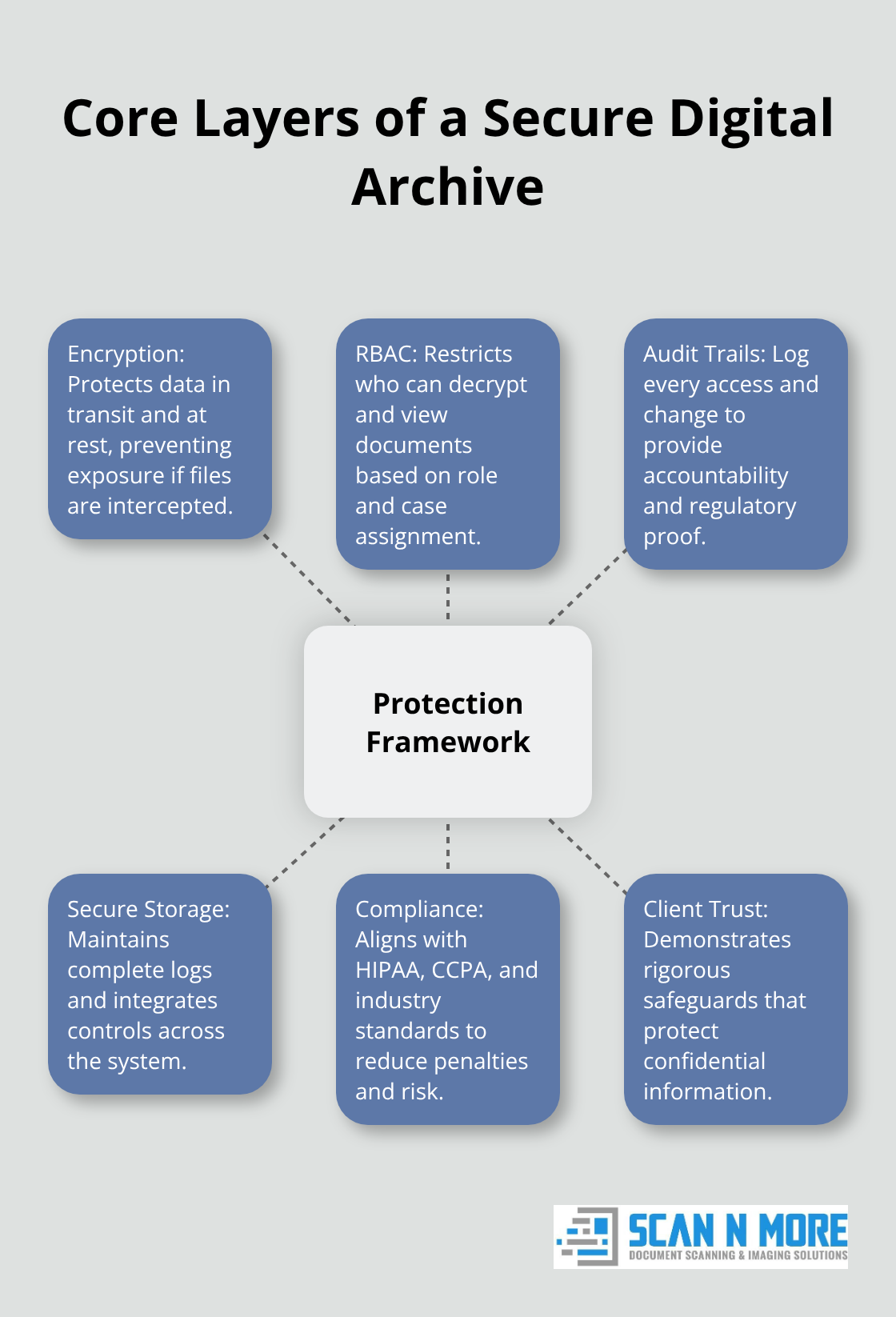
Once your digital archive takes shape, access controls determine who views what information. Role-based access control (RBAC) restricts document visibility based on staff position and case assignment, preventing paralegals from accessing partner-level strategy documents or junior associates from viewing client billing information. Audit trails log every access event, creating the accountability that regulators demand during compliance reviews.
Your digitization investment only pays dividends when the archive actually gets used. Without proper access controls and audit trails, you’ve simply replaced paper chaos with digital chaos-and exposed your firm to serious liability if confidential information reaches unauthorized eyes.
Protecting Confidential Information in Your Digital Archive
Encryption Forms the Foundation of Secure Archives
Encryption transforms documents into unreadable data without decryption keys, making it the foundation of any secure digital archive. Encryption alone solves only half the problem-access controls and audit trails complete the protection framework. End-to-end encryption protects documents both in transit to your storage system and at rest within your archive, preventing intercepted files from revealing sensitive client information. However, encryption creates a false sense of security if your firm fails to implement role-based access control (RBAC) that restricts who can decrypt and view specific documents.
Role-Based Access Control Prevents Internal Threats
Role-based access control systems assign permission levels based on job function, ensuring paralegals cannot access partner strategy documents, junior associates cannot view billing information, and support staff cannot reach client contracts. This granular control prevents the internal data misuse that represents a significant threat to law firms-unauthorized access by employees often causes more damage than external cyber attacks because insiders already possess system credentials. Your team members need access to materials relevant to their roles, but nothing more. Overly permissive access settings expose confidential information to staff members who have no legitimate reason to view specific documents.
Audit Trails Create Accountability and Regulatory Proof
Audit trails record every action within your digital archive: who accessed which documents, when access occurred, what changes were made, and whether files were printed or downloaded. These logs create accountability that satisfies regulatory requirements and protects your firm during compliance audits or breach investigations. Healthcare providers operating under HIPAA face penalties up to $50,000 per violation when they cannot demonstrate proper access controls and audit documentation. Firms handling California resident data must comply with CCPA requirements, which impose penalties ranging from $100 to $750 per consumer per incident for violations.
Documentation Demonstrates Compliance During Audits
A comprehensive audit trail system means you possess documented evidence that confidential information stayed protected, access followed authorization protocols, and suspicious activity triggered appropriate responses. Without audit trails, regulators view your security posture as inadequate regardless of encryption strength. Courts and compliance officers expect to see detailed logs showing exactly who touched sensitive documents and when. This documentation transforms your digital archive from a liability into proof that your firm takes data protection seriously.
Integration With Secure Storage Solutions Completes Protection
Your storage solution must maintain complete audit logs alongside encryption and access controls. Professional document scanning services can help integrate these security layers into a cohesive system that protects client trust during digitization. The combination of encryption, RBAC, and audit trails creates a protection framework that satisfies industry-specific compliance standards and demonstrates to clients that their confidential information receives appropriate safeguards in your digital environment.
Final Thoughts
Legal document digitization eliminates the financial drain of paper storage while recovering thousands of billable hours annually. A mid-sized law firm spending $15,000 to $30,000 yearly on physical storage, retrieval staff, and climate-controlled facilities redirects those funds toward client service and growth. Your team locates documents in seconds instead of hours, e-discovery searches return results instantly, and compliance audits become straightforward because audit trails document exactly who accessed sensitive information and when.
Encryption, role-based access controls, and comprehensive audit trails create protection frameworks that satisfy HIPAA, CCPA, and industry-specific regulatory demands. Paper storage offers zero accountability and exposes your firm to penalties reaching $50,000 per HIPAA violation or $750 per consumer per CCPA incident. Digital archives transform this liability into documented compliance proof that protects client trust and your firm’s reputation.
We at Scan N More help law firms transition to secure digital archives through professional document scanning services that handle on-site and off-site scanning for all document formats. Our team implements security controls from day one, transforming your paper-based workflows into efficient digital solutions. Contact Scan N More to discuss your firm’s specific legal document digitization needs and receive a quote within hours.