
Remote access to documents has become non-negotiable for modern businesses. Teams spread across different locations need to retrieve files instantly, make decisions faster, and collaborate without friction.
At Scan N More, we’ve seen firsthand how the right approach to remote document access transforms operations. This post covers what actually works: security practices that hold up, workflow improvements you can measure, and real obstacles you’ll face during implementation.
Protecting Documents During Remote Access
Encryption forms your security foundation
Encryption stands as the foundation of remote document security, yet most organizations treat it as a checkbox rather than a strategic priority. When documents travel across networks to remote workers, they face exposure during transit and at rest on devices. End-to-end encryption keeps data unreadable to unauthorized parties throughout the entire access chain. According to Eurostat data from 2024, 69.01% of EU enterprises now provide remote access to documents, which means millions of files move across networks daily without adequate protection. The standard approach involves AES-256 encryption for data at rest and TLS 1.2 or higher for data in transit, but implementation varies wildly across organizations.

Treat encryption not as optional but as mandatory across all remote document workflows, with no exceptions for convenience or legacy systems.
Authentication layers demand more than passwords
Multi-factor authentication has become table stakes, yet organizations still deploy it inconsistently. MFA should protect every remote access session to document repositories, combining something you know, something you have, and something you are. Per-session MFA-where users authenticate each time they access a specific document rather than once per day-dramatically reduces credential theft risks. Credential vaulting with per-session credential injection allows teams to access document stores without exposing passwords or secrets to individual users, which eliminates a major attack vector. Zero Trust access models take this further by requiring continuous authentication and authorization based on user identity, device health, and access context. Organizations implementing least-privilege access combined with just-in-time access eliminate standing privileged access when opening or editing documents, reducing the window of vulnerability significantly.
Compliance requires visibility into every action
Compliance frameworks like SOC 2 require comprehensive audit trails showing who accessed which documents and when, but many organizations lack real-time visibility into these activities. Session recording and customizable analytics support audits for document governance, eDiscovery, and regulatory requirements without manual log reviews. Compliance with industry regulations demands more than technical controls; it requires demonstrable evidence that access policies remain enforced consistently. Real-time dashboards provide immediate insight into remote document access patterns, flagging anomalies before they become breaches. Network segmentation isolates document stores so compromising one segment does not automatically expose all documents, which matters for organizations managing sensitive information across multiple departments. FedRAMP Moderate authorization supports government-grade compliance for cloud-based remote access to documents, critical for organizations serving public sector clients. Auditable access means every action receives recording with timestamps and context, transforming compliance from a burden into a competitive advantage.
These security and compliance measures form the backbone of trustworthy remote document access, yet they only succeed when your organization addresses the practical workflow challenges that follow.
How Remote Document Access Speeds Up Operations
Remote document access eliminates the delays that plague traditional workflows, where teams wait hours or days for files to arrive via email or courier. When 69.01% of EU enterprises now provide remote access to documents, the organizations still relying on older methods face a competitive disadvantage. Instant access to files means your finance team approves invoices within minutes instead of days, your legal department reviews contracts in real time during negotiations, and your sales team closes deals faster because proposals reach clients immediately. The speed gain compounds across departments: faster decision-making reduces project timelines, accelerates problem-solving, and eliminates the friction that slows down remote teams.

Organizations that implement remote document access report measurable improvements in cycle times, with some cutting document retrieval time from hours to seconds.
Collaboration transforms when teams access the same documents simultaneously
Remote document access fundamentally changes how distributed teams work together. Instead of coordinating email threads where version 3 conflicts with version 5, team members access the same living document simultaneously and make edits that everyone sees in real time. The information and communication sector in the EU, which leads remote access adoption at 93.4% of enterprises conducting remote meetings, demonstrates how seamless collaboration drives productivity. Your engineers, designers, and project managers stop wasting time on status update meetings and instead focus on actual work because everyone has instant access to current project documents. This eliminates the context-switching that drains productivity, where employees spend an average of 1.8 hours per day searching for and gathering information. When document access is instantaneous and permission-based, onboarding new team members accelerates because they immediately access the resources they need without manual file distribution. Cross-department collaboration accelerates too, because marketing pulls the latest product specifications while development is still finalizing them, rather than waiting for an official handoff that happens weekly.
Document retrieval costs drain more resources than most organizations realize
Most organizations never calculate the true cost of document retrieval delays, yet the numbers are staggering. Employees in industries with lower remote access adoption, like accommodation and food service at 39.79% of enterprises providing all three remote access types, lose productivity constantly to manual file hunting. Every time someone needs to contact another department to request a file, follow up on that request, wait for retrieval, and then receive it via email, your organization burns labor hours that could be spent on revenue-generating work. Remote document access eliminates this entire category of waste. Your team stops sending Slack messages asking for the latest budget spreadsheet and instead retrieves it themselves in seconds. The reduction in administrative overhead is substantial enough that many organizations recover their remote access investment within months, purely from the labor hours saved on file coordination and retrieval. When your team operates across multiple locations, this efficiency gain multiplies because geographic distance no longer creates delays in document access.
Speed advantages compound across time zones and departments
Geographic distribution creates unique challenges for traditional document workflows. A finance team in New York waiting for approval from a manager in Singapore faces overnight delays that slow down critical business processes. Remote document access eliminates this friction entirely, allowing teams to work asynchronously on shared documents without waiting for someone in another region to retrieve a file from a filing cabinet. Your operations team in London accesses the same inventory spreadsheet that your warehouse team in Mumbai is updating, with changes visible instantly across all locations. This real-time visibility means decisions happen faster, problems get solved without email chains, and projects move forward continuously rather than stalling at handoff points. The speed advantage matters most when your team spans multiple time zones, because instant access replaces the coordination overhead that traditionally slows down distributed organizations.
These workflow improvements create measurable business impact, yet they only succeed when your organization addresses the technical obstacles that stand between current operations and seamless remote document access.
What Really Stops Remote Document Access Adoption
Organizations face three distinct obstacles when rolling out remote document access, and understanding which one affects your operation most determines your implementation strategy.
Legacy systems block modern remote access
Legacy systems represent the first major barrier, particularly in finance, healthcare, and manufacturing where document repositories built fifteen years ago were never designed for remote access. These systems often lack API capabilities and cannot integrate with modern security frameworks like Zero Trust access models. Integration becomes expensive and time-consuming, requiring custom middleware or wholesale system replacement that diverts budget from other priorities. Organizations managing thousands of scanned documents stored in systems that predate cloud computing entirely face honest assessment decisions about whether upgrading the system justifies the investment or whether a phased migration strategy works better. Some organizations discover that building a modern document access layer on top of legacy systems costs less than replacement, while others find that the technical debt makes modernization the only viable path forward.
Network infrastructure creates uneven access across regions
Network infrastructure creates the second obstacle, though it affects remote teams differently depending on geography and industry. Employees in rural areas or developing regions face bandwidth limitations that make accessing large document files painfully slow, while those in urban centers with fiber connectivity experience seamless access. According to Eurostat data, 60.24% of EU enterprises provided all three types of remote access in 2024, but this figure masks significant regional variation where infrastructure quality determines actual usability. A manufacturing company with field technicians accessing technical drawings discovers that 4G connectivity makes document retrieval unreliable during critical operations, forcing decisions about whether to cache documents locally or invest in better connectivity infrastructure. Organizations must test remote document access under actual network conditions their users face rather than assuming office-grade internet speeds apply everywhere.
User adoption fails without proper change management
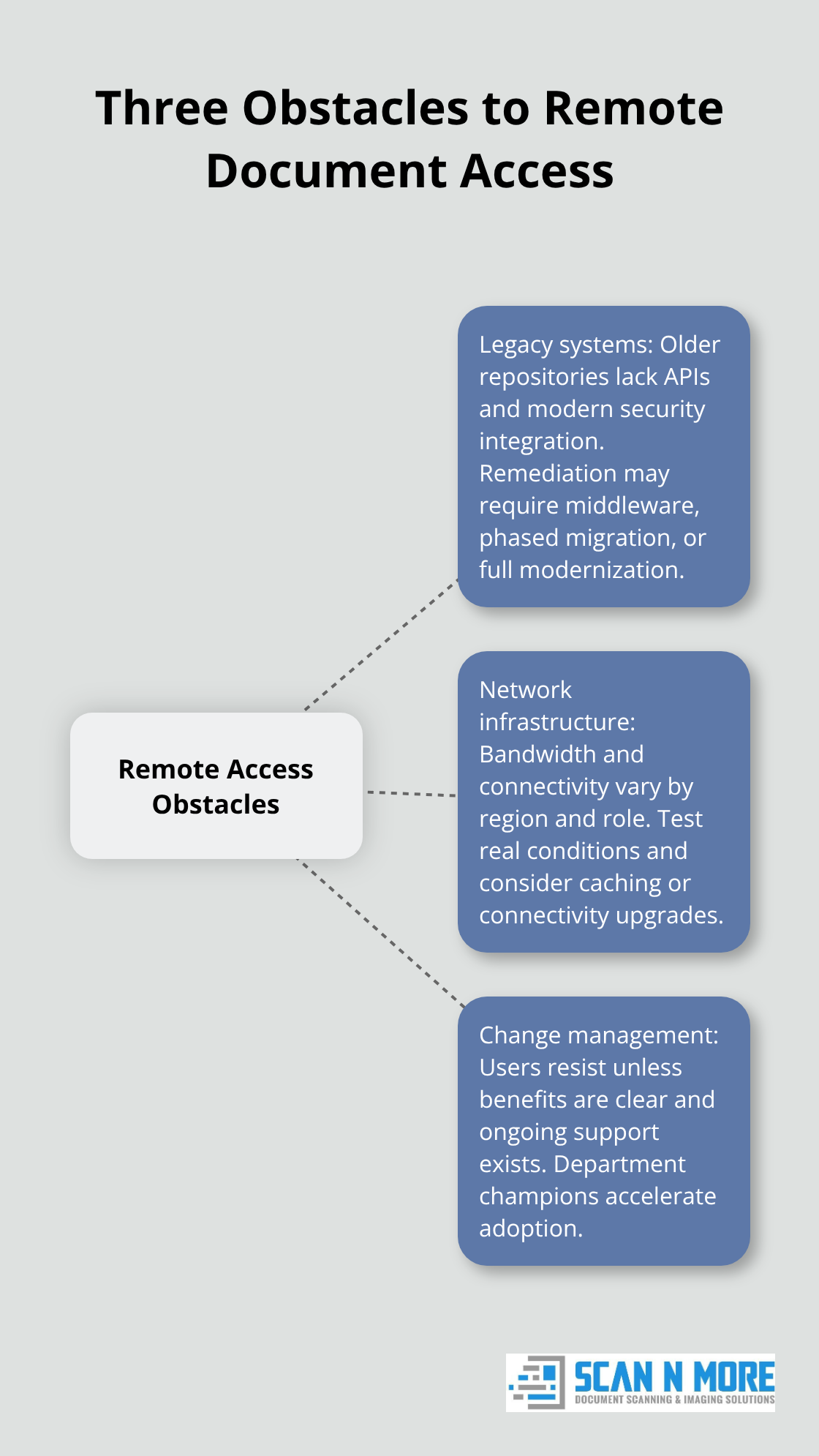
The third obstacle proves most deceptive: user adoption fails without proper change management and clear communication about why the shift matters. Employees accustomed to requesting files through established channels perceive self-service document access as additional work rather than convenience, particularly when the training occurs as a one-hour session before launch rather than ongoing support. Organizations that treat adoption as a change management problem rather than a technology problem succeed faster, assigning champions within departments who become trusted advocates rather than relying on IT to mandate behavior change. Employees need to understand how remote document access reduces their workload and accelerates their daily tasks, not simply receive instructions on how to use new software. When teams see tangible benefits (faster approvals, fewer email requests, instant file access), resistance transforms into enthusiasm that spreads organically across departments.
Final Thoughts
Remote access to documents delivers three concrete benefits that justify implementation investment. Your organization accelerates decision-making by eliminating retrieval delays that traditionally consume hours or days, reduces administrative overhead as teams stop coordinating file requests and instead retrieve documents themselves in seconds, and enables seamless collaboration across distributed teams and time zones where geographic distance no longer creates workflow friction. These benefits compound over time as your team adapts to instant document availability.
Overcoming implementation barriers requires addressing each obstacle directly rather than hoping they resolve themselves. Legacy systems demand honest assessment about whether modernization or phased migration makes financial sense for your operation, network infrastructure gaps need testing under actual user conditions rather than assumptions based on office connectivity, and user adoption succeeds when you treat it as change management rather than technology deployment by assigning department champions who demonstrate tangible benefits to their peers. Start your remote access to documents strategy today, whether that means scanning legacy documents or securing access to existing digital repositories.
At Scan N More, we offer professional document scanning services that handle all document formats, including legal and medical documents, with guaranteed data security and compliance. This digitization foundation makes remote access to documents possible, eliminating the paper retrieval delays that plague traditional workflows. Organizations with existing digital repositories can deploy remote access controls within weeks, while those managing hybrid paper-and-digital environments benefit from phased digitization that prioritizes high-volume document types first.